August 29, 2024
Lychee Slicer 6.2: 10x Faster Slicing & Cloud Backup
Releases
Lychee Slicer 6.2 marks a significant leap forward in performance and reliability. With two major updates—Fast Slicing and enhanced backup options—this version simplifies the life of all 3D printing enthusiasts. Spend less time waiting and more time creating prints. Whether you're using Lychee Slicer Lite or Plus, you'll experience the benefits of this update.
New Fast Slicing Mode: Slice in a Flash Without Killing the Quality
One of the most exciting features of Lychee Slicer 6.2 is the new fast slicing mode. Your time is precious so we've optimized the slicing process to deliver exceptional speed without compromising on your print quality. Welcome to more efficient printing sessions.
Why Fast Slicing is Essential for Your 3D Printing Projects?
With the rise of high-resolution printers (12K, 14K and beyond), slicing times can become significantly longer, especially for complex models or when using Anti-Aliasing. We knew we had to find a solution to save you time. That's why we developed this new mode, which leverages your CPU to increase the slicing performance by 10 times. Based on extensive testing and feedback, the results are truly remarkable.
How to activate the Fast Slicing mode in Lychee Slicer 6.2?
First, make sure you have the latest version of Lychee Slicer installed. By default, it is set on Normal Slicing but once your 3D model is supported in Lychee Slicer you can easily switch from “Normal” to “Fast Slicing”:
1. Click on the "Export" button in the slicer toolbar.
2. In the "Slicing Engine" section, select "Fast Slicing."
3. Click "Export slices to file" to start the Fast Slicing process.
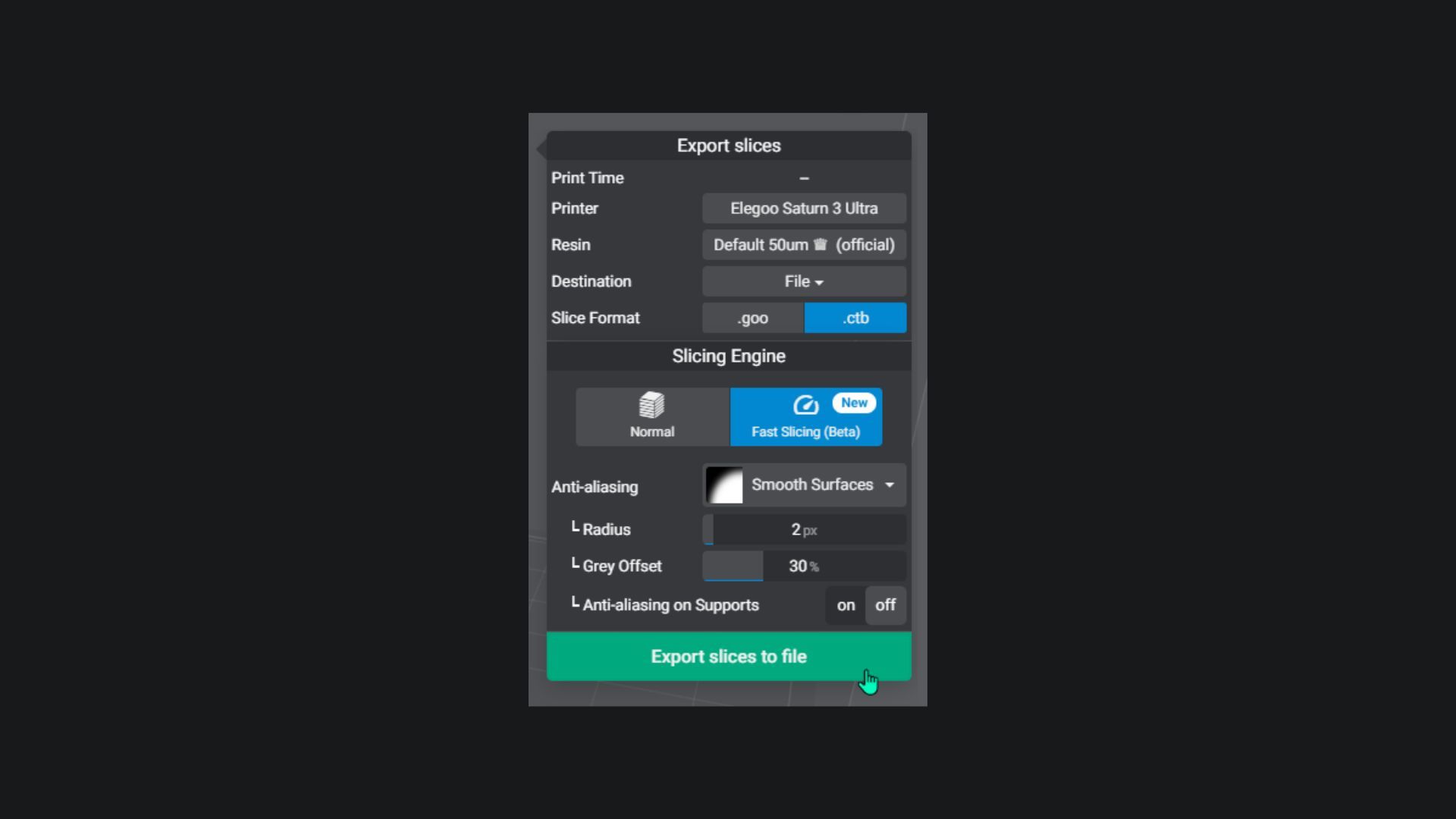
Please note: Fast Slicing is currently in Beta and may not work perfectly with all models or computer configurations, especially for certain file formats. If you encounter any issues, you can always switch back to Normal Slicing. You’re welcome to, contact our support team for more information. Enjoy the speed boost!
New Cloud Backup & Local Saves: Never Lose Your Settings Again.
The Fast Slicing mode isn't the only exciting news. We understand the time and effort you put into crafting your perfect print settings, that's why we've introduced a robust backup system that combines cloud storage and local saves.
Cloud Backup: Your Settings, Anywhere, Anytime
Tired of manually reconfiguring your printer settings on every device? Lychee Slicer 6.2's new cloud backup feature eliminates the hassle. Your settings are automatically synchronized across all your machines, so you can seamlessly pick up where you left off, no matter where you're printing.
How it works? It's simple! Lychee Slicer stores your data in the cloud, a secure, digital storage space accessible from anywhere with an internet connection. This means your settings are always up-to-date and ready to use, whenever you need them.
Add Local Backup for Extra Security
In addition to our cloud storage, we've added a local save option for maximum safety. This acts as an ultimate backup, preventing you from losing your precious printer, resin, and support settings.
How it works? Lychee Slicer automatically creates a complete backup of your settings on your local computer, ensuring your data is always protected. If you're using the same account on two computers simultaneously, synchronization will occur live and automatically every 5 minutes
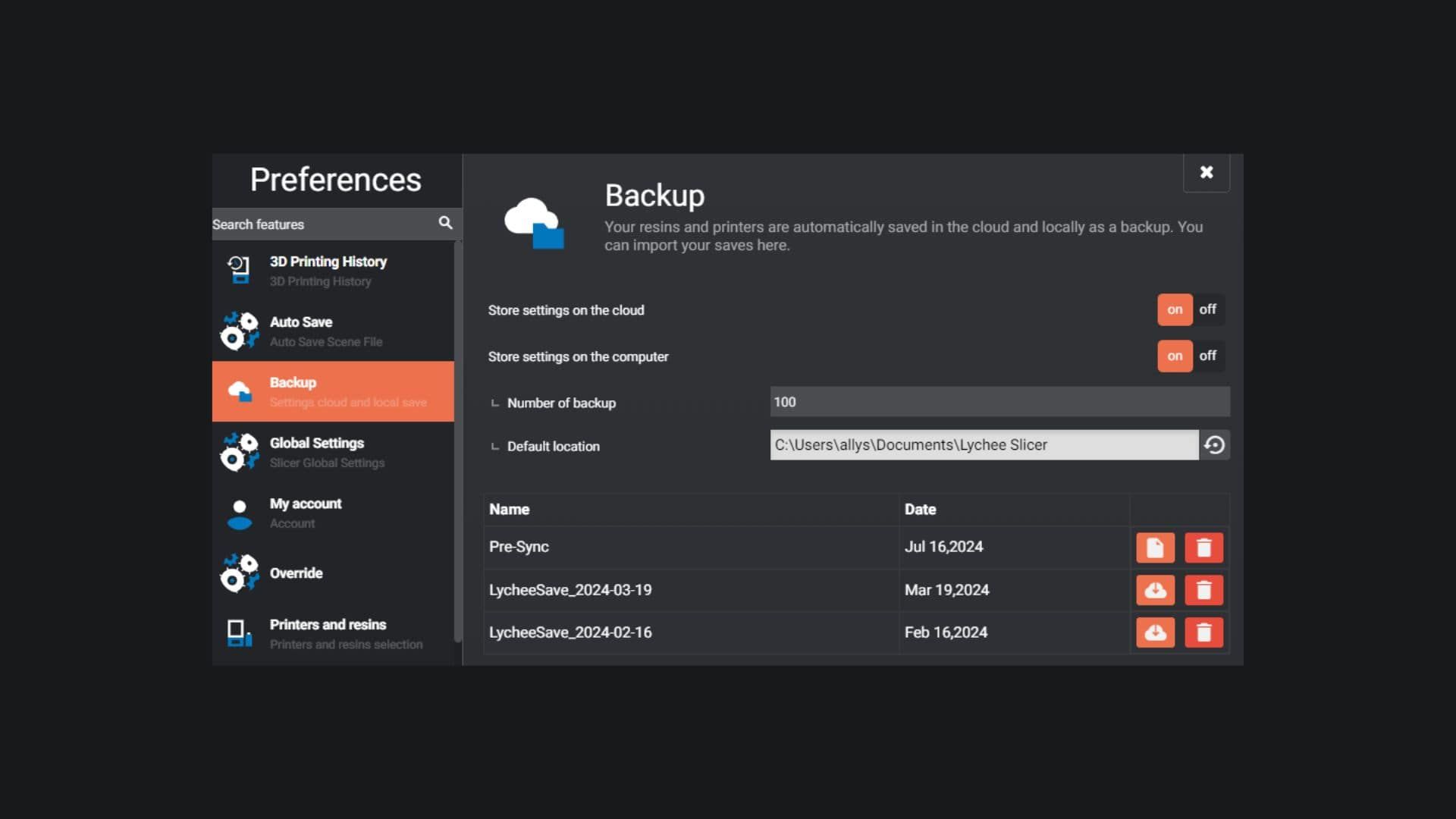
With Lychee Slicer 6.2, your settings are safe and secure, no matter where you're printing.
How to download Lychee Slicer 6.2?
As you’ve seen, Lychee Slicer 6.2 offers a powerful combination of speed and security to enhance your printing experience. By upgrading to the latest version, you'll benefit from these updates and enjoy your 3D printing even more. Embrace the simplicity of 3D printing with Lychee Slicer 6.2!